How to Use AI to Write LinkedIn Posts That Actually Get Leads
AI can write LinkedIn posts that generate real leads, but only if you give it the right inputs and follow a proven framework.
The problem is not the AI. It is the generic prompts and emotionless copy most people produce with it.

TL;DR
- AI LinkedIn posts for lead generation work when they tap into emotion, not just information.
- You can use Bearconnect's built-in AI post tool (it scans your LinkedIn profile and writes posts unique to you) or use ChatGPT/Claude with smart prompts.
- Emotional triggers like pain, fear of missing out, and transformation outperform tips and listicles.
- Claude Sonnet or Claude Opus are currently the best AI models for LinkedIn content that sounds human.
- Consistency + emotional resonance = inbound DMs from qualified leads.
Why Most AI LinkedIn Posts Fail to Generate Leads
AI-generated posts fail because they inform without connecting. Your prospect scrolls past a post the second it feels generic or robotic.
LinkedIn is not a blog platform. It is a trust platform. People buy from people they feel understand them.
A post that says "5 tips to improve your sales process" will always underperform a post that says "I lost a $20K deal because I sent one follow-up too late. Here is what I changed."
The difference is emotion. Emotion stops the scroll. Emotion creates DMs.

If you are still figuring out what type of content resonates, read this first: How to Create LinkedIn Content That Converts: 7 Proven Post Ideas.
What drives engagement on LinkedIn:
- Posts that name a specific pain your audience carries daily
- Stories with a real outcome (win or loss)
- Contrarian takes that challenge a common belief
- Transparent failures that teach a lesson
- Results with a process that the reader can copy
Two Ways to Use AI for LinkedIn Posts That Convert
You have two practical options. Both work. Choose based on your workflow.
Option 1: Use Bearconnect's AI Post Creation Feature
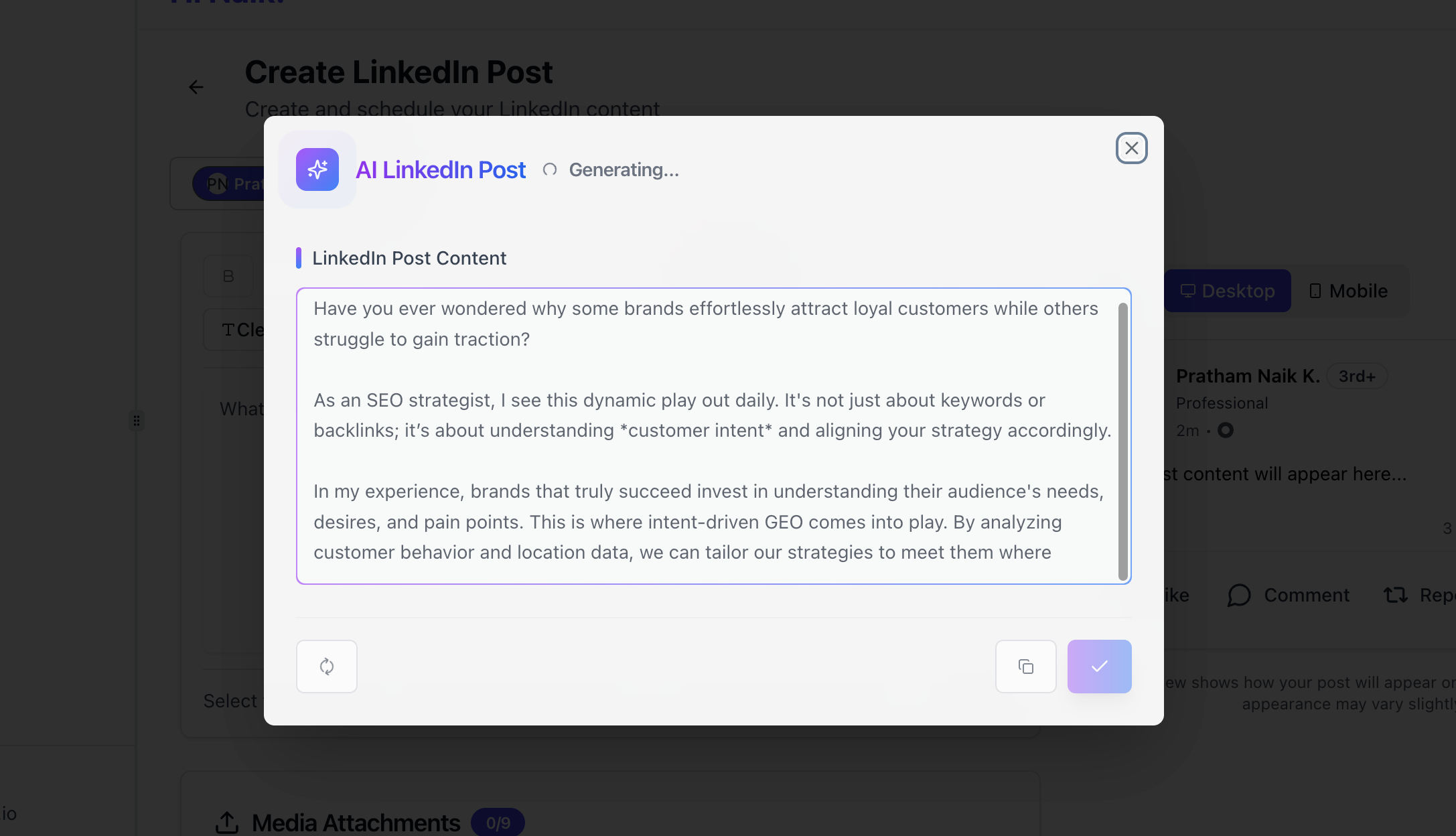
This is the fastest route for LinkedIn users who want posts that sound like them, not like a generic AI output.
Here is how it works:
- Log into your Bearconnect account
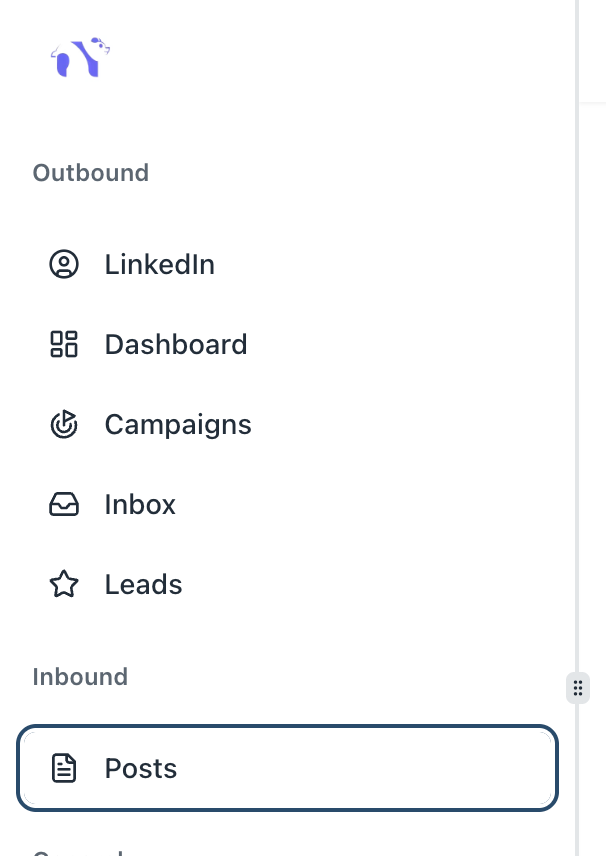
- Go to the Inbound section
- Click on Posts
- Select the AI option
- Click Create Post
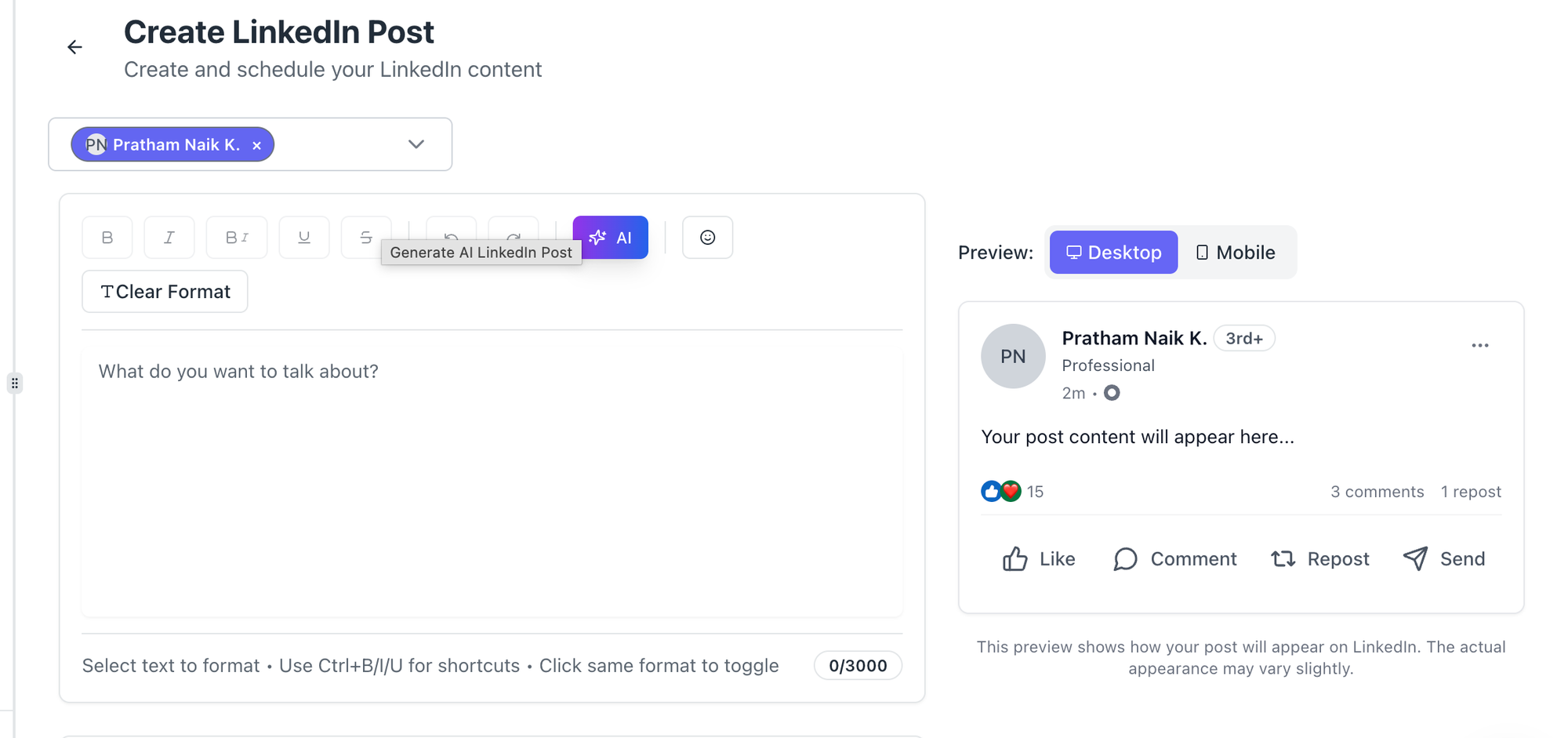
Bearconnect's AI post feature scans your entire LinkedIn profile, your headline, your experience, your summary, and generates posts based on your real background and positioning.
This means the output is unique to you, not copy-pasted from a template.
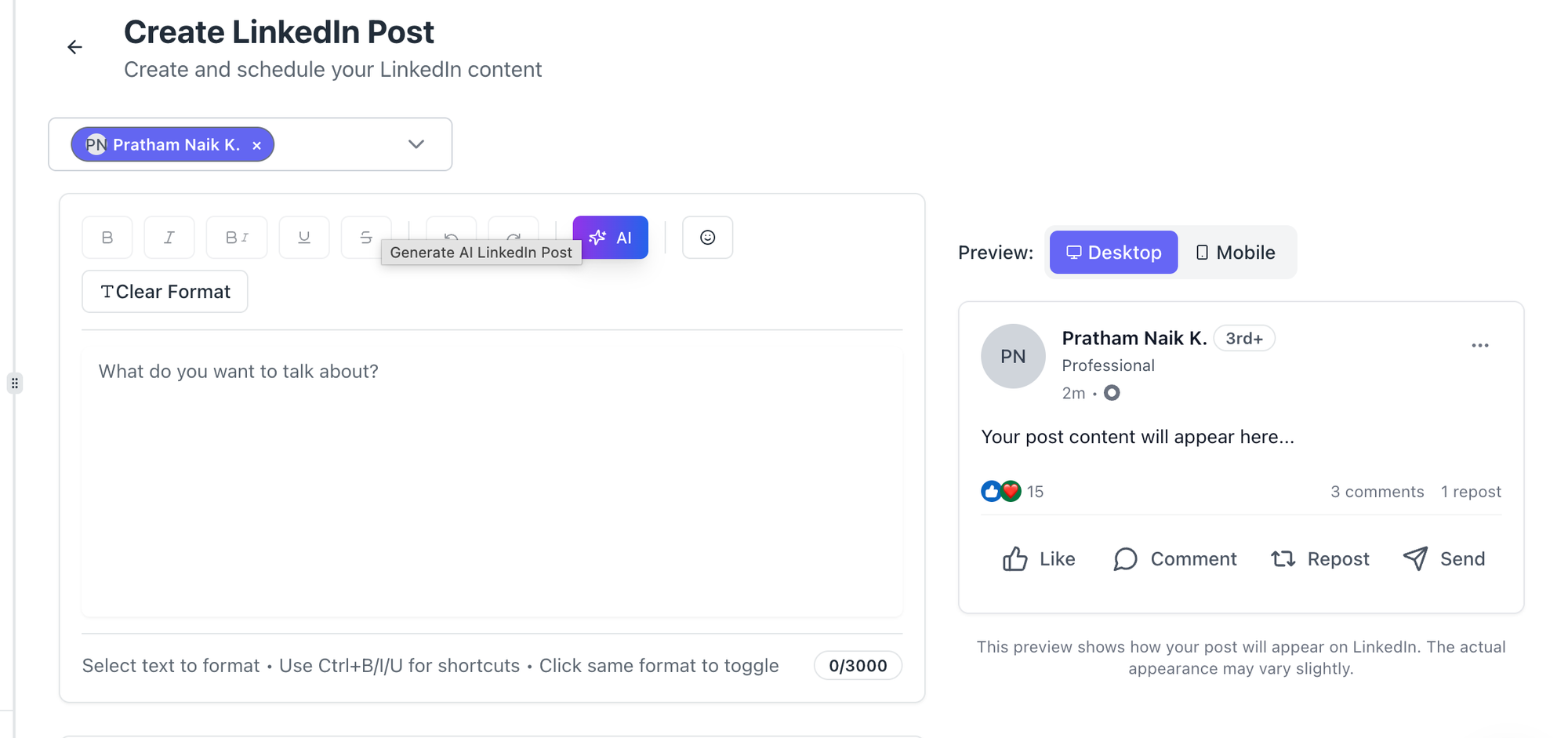
- This means the output is unique to you, not copy-pasted from a template.
- This matters because LinkedIn's algorithm can detect and suppress posts that feel mass-produced.
- When the content reflects your actual voice and experience, engagement rates go up.
Pro Tip: After the AI generates your post, spend 3 minutes editing the opening line. Make it punchier. The first 1.5 lines are what show before the "see more" cutoff. That is your entire hook.
Option 2: Use ChatGPT or Claude with High-Intent Prompts

If you want more control over the angle, emotion, and structure of your post, use Claude or ChatGPT with a detailed prompt.
Which AI model is best for LinkedIn content?
Claude Sonnet and Claude Opus currently produce the most human-sounding LinkedIn copy. Claude maintains emotional nuance and conversational flow better than most models.
ChatGPT-4o is also strong, especially for structured frameworks and lists.
Want to go deeper on AI tools for LinkedIn outreach? Read: Best AI Tool to Automate LinkedIn Outreach.
Use Claude when you want:
- Storytelling-style posts
- Emotional narrative arcs
- Posts that sound like a real person wrote them
Use ChatGPT when you want:
- Frameworks and step-by-step breakdowns
- Quick hooks and punchy one-liners
- Multiple post variations fast
The Prompts That Actually Work (Copy These)
The quality of your AI output depends entirely on the quality of your prompt. Bad prompt, bad post.
Prompt 1: Pain-Driven Story Post (Best for Lead Generation)
Use this when you want your post to stop the scroll and create DMs.
Act Like You are a LinkedIn content expert. Write a LinkedIn post for [your role, e.g., B2B SaaS founder].

Use this structure:
- Hook: Name a specific pain or mistake that my target audience [e.g., sales directors at B2B companies] faces daily
- Story: Share a short, real-sounding story about experiencing or observing this pain
- Lesson: The one thing that changed the outcome
- CTA: A soft question that invites comments

Tone: Conversational, direct, no fluff. Avoid corporate language.
Audience: [Your ICP, e.g., founders and sales leaders at 10-50 person B2B companies]
Topic: [Your specific topic, e.g., why cold outreach response rates drop below 2%]
Word count: 150-200 words
Do not use em dashes.
Prompt 2: Contrarian Take Post (Best for Authority Building)
Write a LinkedIn post that challenges a common belief in [your industry].

Structure:
- Open with a bold statement that most people would disagree with
- Back it up with 2-3 specific reasons
- End with a question that invites debate

Tone: Confident but not aggressive. Sounds like a practitioner, not a content creator.
Topic: [e.g., why posting every day on LinkedIn actually kills your credibility]
Do not use em dashes.
Prompt 3: Transformation Post (Best for Social Proof)
Write a LinkedIn post structured as a before/after transformation story.

Before: [Situation you or a client was in, e.g., spending 10 hours per week on manual LinkedIn outreach with 0 qualified leads]
After: [Result achieved, e.g., 3 inbound sales calls per week from LinkedIn alone]
What changed: [The specific action taken, e.g., switched to AI-generated posts + automated outreach]

Keep it under 180 words. No corporate language. First sentence must hook immediately.
Do not use em dashes.
Pro Tip: Always add at the end of your prompt: "Do not start with 'I'. Do not use phrases like 'In today's world' or 'In conclusion'. Make the first sentence the most provocative line in the post."
For message templates that pair well with your content posts, check out: LinkedIn Message Templates for Automation.
The Emotional Triggers That Turn Reads Into Leads
The best LinkedIn posts for lead generation do not just share knowledge. They activate an emotion.
Here are the emotions that convert best on LinkedIn, based on content patterns from high-performing B2B accounts:
| Emotion | Why It Works | Post Type |
|---|---|---|
| Pain Recognition | Prospect feels understood | "I wasted 6 months doing X" |
| Fear of Missing Out | Creates urgency without ads | "Most founders don't realize until it's too late" |
| Hope/Aspiration | Paints the after state | Transformation posts |
| Curiosity | Drives clicks and comments | Contrarian takes |
| Validation | Confirms a belief they hold | "You're not lazy. The system is broken." |
Pain recognition is the highest-converting trigger for B2B audiences. When your post names a pain your ICP carries but has never seen articulated, they screenshot it, comment, and DM you.
For more post formats that tap into these emotions: LinkedIn Post Ideas That Grew Followers.
How to Structure a High-Converting LinkedIn Post
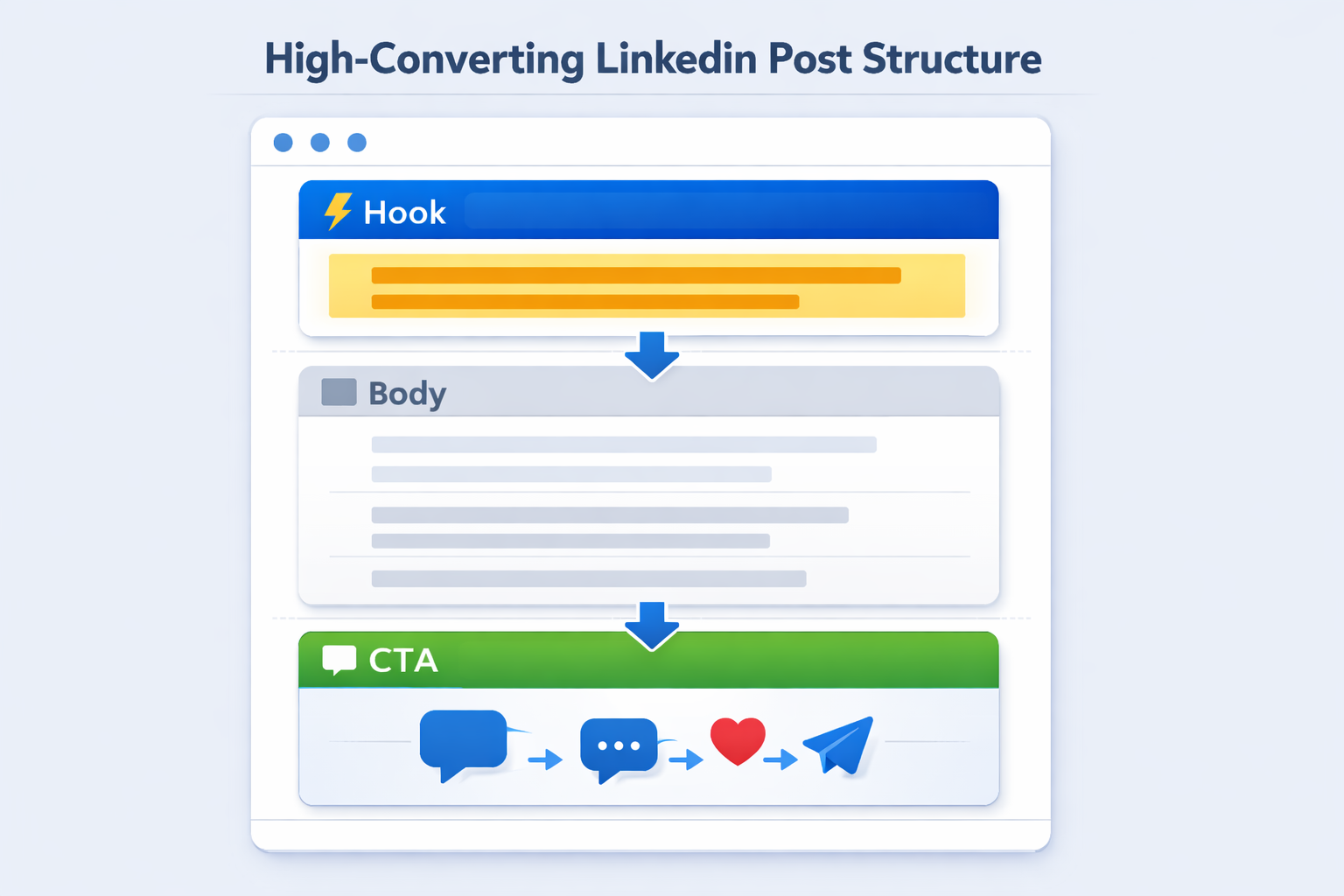
Follow this exact post structure for every post you write or generate with AI:
The Hook (Lines 1-2)
This is everything. The first 1.5 lines show in the feed before "see more." Your hook must either:
- Name a painful truth
- Make a bold claim
- Ask a sharp question
- Share a counter-intuitive statement
Weak hook: "LinkedIn is a great platform for B2B lead generation."
Strong hook: "I booked 12 sales calls in 30 days without running a single ad. Here is the exact system."
Before writing strong hooks, your profile needs to back up your credibility. Read: How to Create a Great LinkedIn Profile.
The Body (Lines 3-12)
- Deliver the story, framework, or lesson
- Use short paragraphs (1-2 lines each)
- Use white space aggressively — it improves readability
- Add specific numbers and details to build credibility
The CTA (Last 2-3 Lines)
Soft CTAs outperform hard sells on LinkedIn. Ask a question that invites your ICP to self-identify.
Example: "Are you still doing this manually? Drop a comment or DM me if you want the full framework."
Once they respond, your outreach begins. See how to do it without sounding salesy: LinkedIn Outreach Without Being Salesy.
How Bearconnect Makes This Workflow Scalable
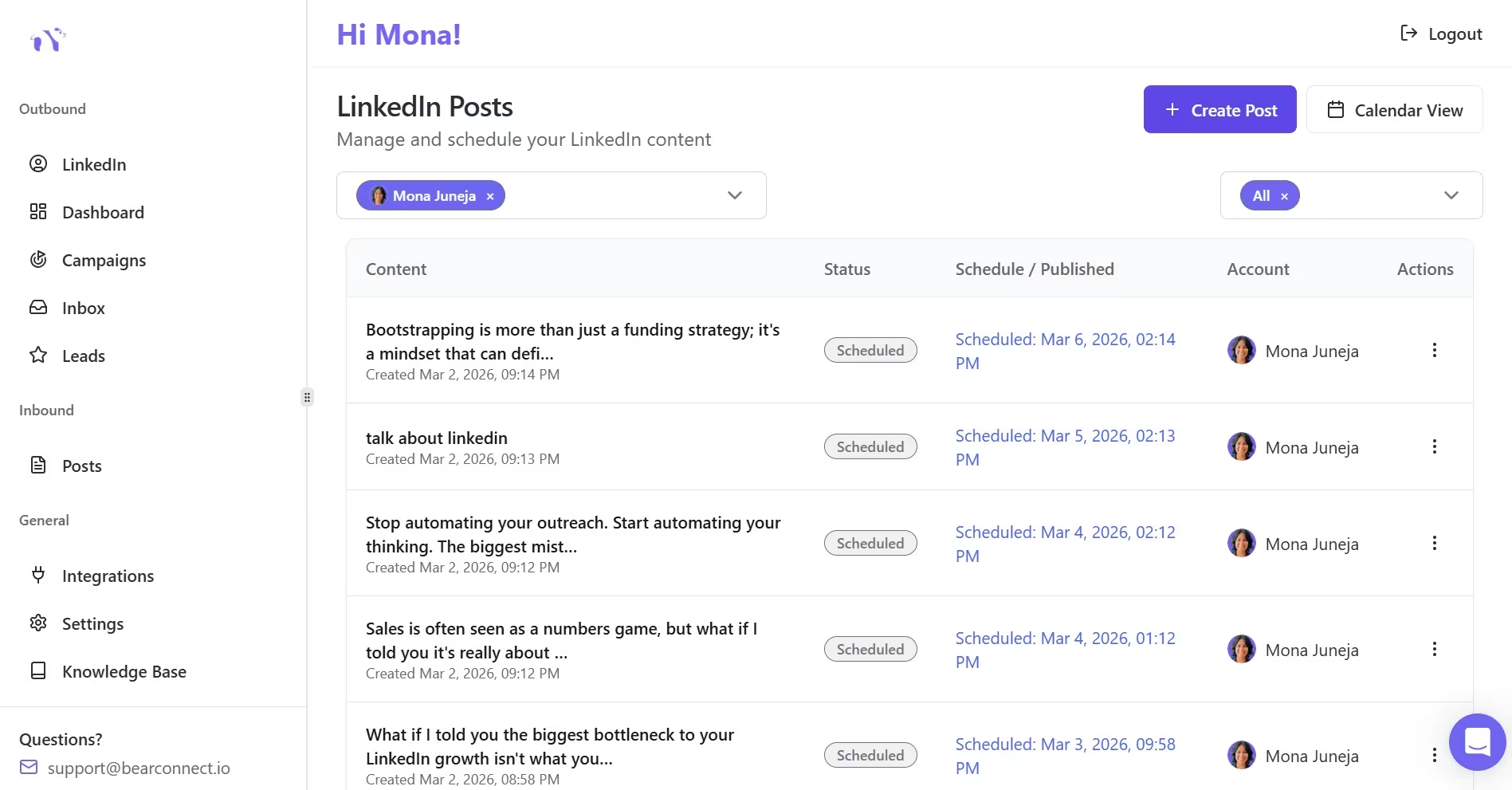
Writing one great post is hard. Writing 20 consistently is where most people quit.
- Bearconnect solves this with its AI post creation feature that generates posts based on your actual LinkedIn profile, so the content stays relevant to your niche and voice.
- After you generate the post, you can schedule it directly inside Bearconnect without leaving the platform.
For teams and agencies managing multiple LinkedIn profiles, Bearconnect lets you manage unlimited LinkedIn accounts from one dashboard.
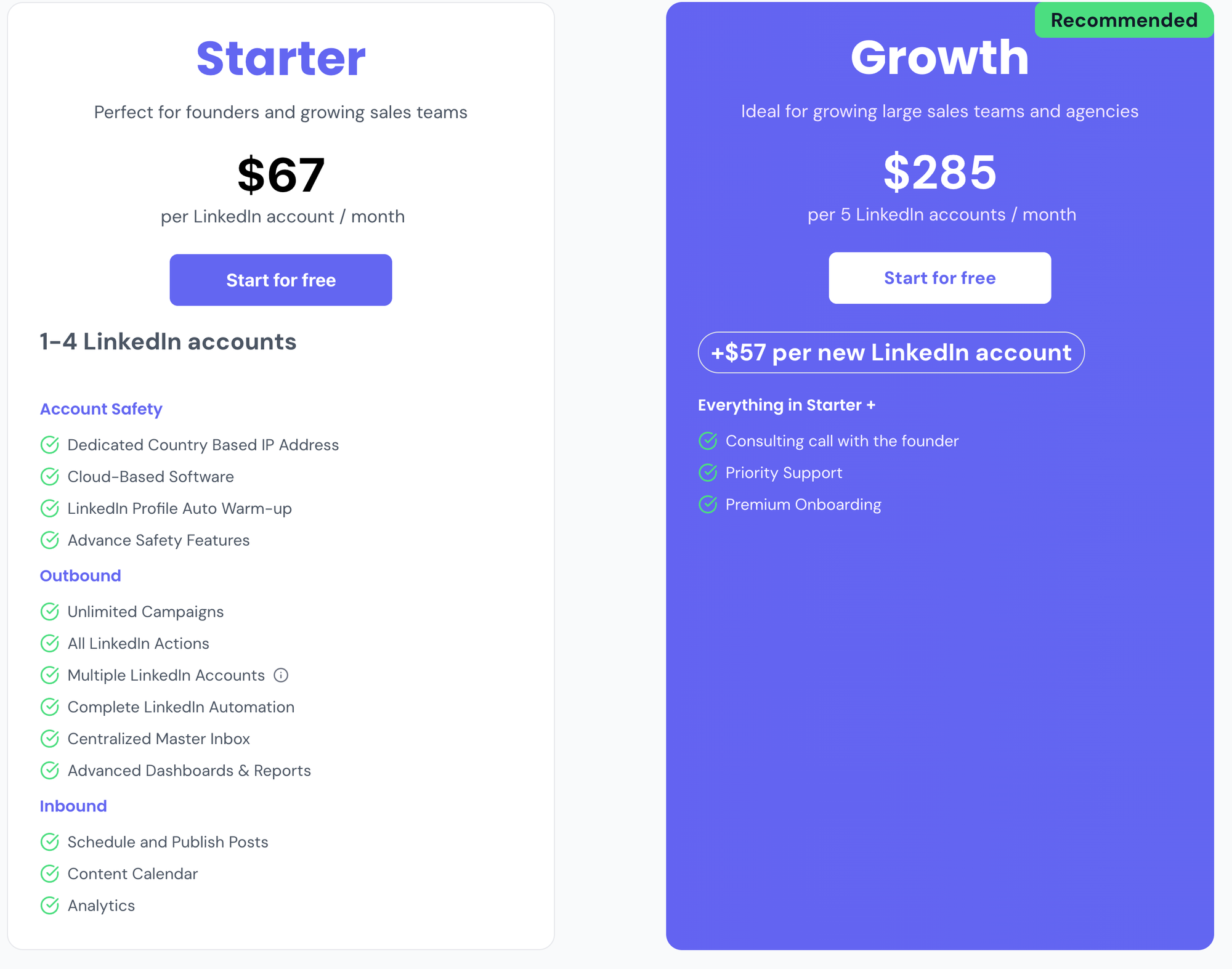
- Each account costs $67/month, and when you connect 5 or more accounts, the price drops to $57/month per LinkedIn account. See the full breakdown on the Bearconnect Pricing page.
- This means an agency managing 10 client LinkedIn accounts pays $570/month total, versus $1,500 to $5,000 on traditional tools.
- See how agencies handle this at scale: How Agencies Manage Multiple LinkedIn Accounts.
The full content workflow with Bearconnect:
- Go to Posts inside the Inbound section
- Click Create Post, select the AI option
- AI scans your LinkedIn profile and generates a unique post
- Edit the hook and add personal details
- Schedule the post to publish at optimal times
- Combine with automated outreach campaigns to convert post viewers into leads
Post Consistency Beats Post Perfection?
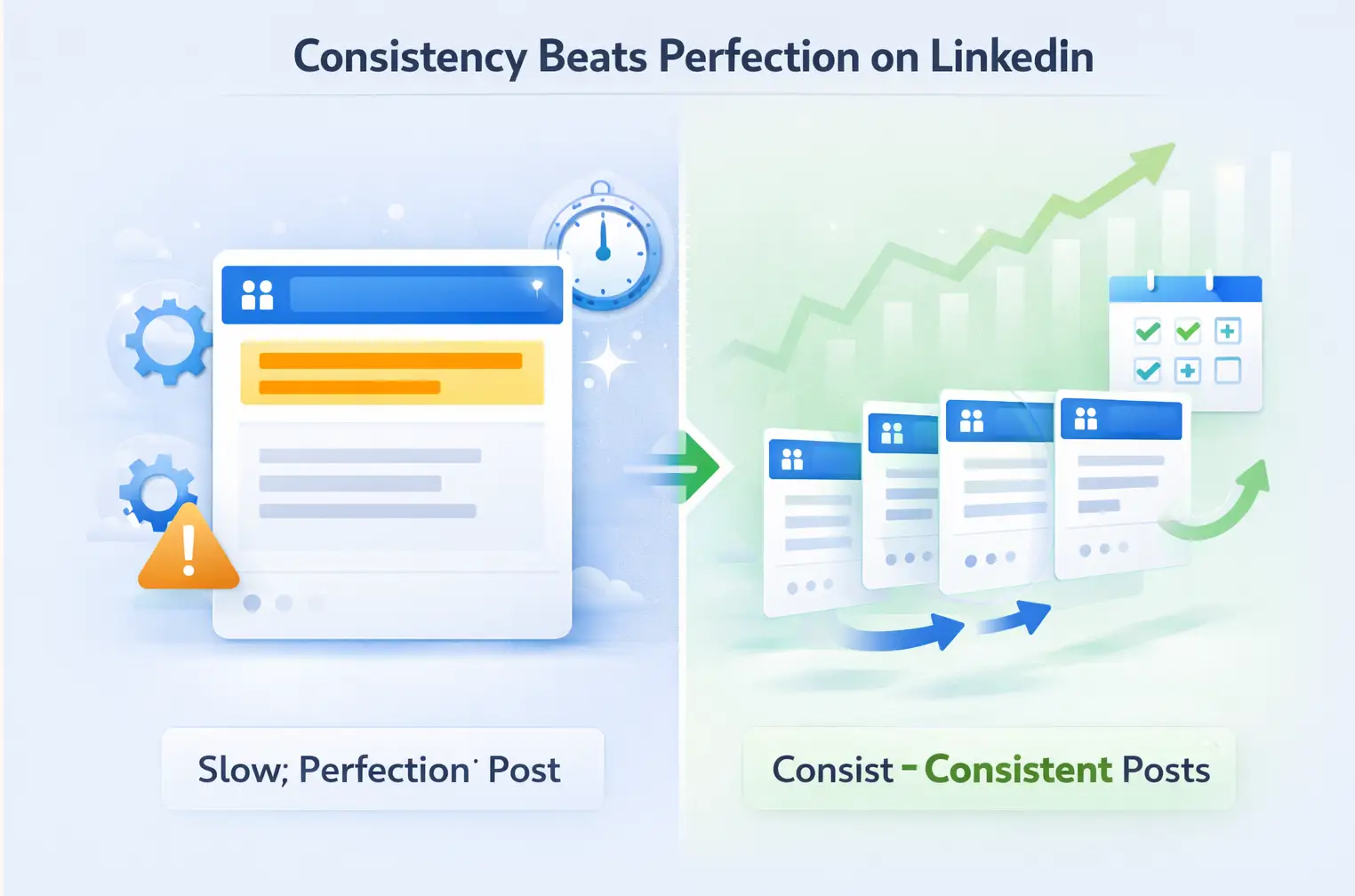
The biggest mistake B2B founders and marketers make is waiting for the perfect post.
LinkedIn's algorithm rewards accounts that post consistently. An account posting 3 times per week with average posts will outperform an account posting once a month with a "perfect" post.
Set a minimum posting frequency and stick to it:
- Minimum: 3 posts per week
- Optimal: 5 posts per week
- With AI tools: Batching 2 weeks of content in one session is realistic
For a step-by-step guide to automating your posting schedule: How to Automate LinkedIn Posts.
Pro Tip: Use AI to batch create 10 posts in one sitting. Edit them all. Schedule them in Bearconnect. You will never scramble for content again.
Real-World Example: What This Looks Like in Practice
A B2B SaaS consultant uses the pain-driven story prompt above with Claude Opus.
- The topic: Why their ICP (sales directors) keeps losing deals at the proposal stage.
- The output: A 170-word post that opens with "I watched a $40K deal fall apart because we sent a 14-page PDF. Here is what we do instead."
The post gets 80 comments. Twelve of them are from sales directors saying "this is exactly what happened to us."
Three of those commenters become discovery call bookings within 48 hours.
This is not a viral post strategy. This is a lead generation strategy that uses content as the first touchpoint.
5 FAQs: AI LinkedIn Posts for Lead Generation
Q1. Is AI-generated LinkedIn content detectable by LinkedIn's algorithm?
LinkedIn does not penalize AI-assisted content. What hurts visibility is generic, low-engagement content. Always edit AI drafts to add personal details, specific numbers, and your actual voice before publishing.
Q2. Which AI tool writes the best LinkedIn posts?
Claude Opus and Claude Sonnet currently produce the most natural, human-sounding LinkedIn copy for storytelling posts. ChatGPT-4o is strong for frameworks and structured content. Bearconnect's built-in AI is the best option if you want posts generated from your actual LinkedIn profile data.
Q3. How often should I post on LinkedIn to generate leads?
Post a minimum of 3 times per week. Accounts that post 4 to 5 times per week see significantly faster follower growth and inbound DM volume. Consistency matters more than frequency once you pass 3 posts per week.
Q4. What type of LinkedIn posts generate the most leads?
Pain recognition posts and transformation/case study posts consistently generate the most inbound DMs and qualified leads. These post types make the reader feel understood and create a natural reason to reach out to you directly.
Q5. Can I use AI to manage LinkedIn posts for multiple accounts?
Yes. Tools like Bearconnect let you generate AI posts and schedule them across unlimited LinkedIn accounts from one dashboard. This is especially useful for agencies and sales teams managing multiple profiles. Pricing starts at $67/month per LinkedIn account, dropping to $57/month per account when you connect 5 or more.
Start Generating Leads From LinkedIn Content Today
You now have the prompts, the frameworks, the emotional triggers, and the tools.
The next step is simple: write one post today using the pain-driven story prompt above. Use Claude or ChatGPT to draft it, edit the hook yourself, and publish it.
If you want the whole system automated, including AI post generation based on your LinkedIn profile, post scheduling, and outreach campaigns, try Bearconnect at bearconnect.io.
The AI post feature alone saves most users 5 to 8 hours per week on content creation.
Related Reads
If this blog helped you, these pages go deeper on each part of the LinkedIn lead generation system:
- How to Create LinkedIn Content That Converts: 7 Proven Post Ideas — Get 7 ready-to-use post formats built specifically for B2B lead generation.
- LinkedIn Post Ideas That Grew Followers — Real post ideas that drive follower growth and inbound attention.
- How to Automate LinkedIn Posts — Step-by-step guide to scheduling and automating your LinkedIn content without manual effort.
Ready to Transform Your LinkedIn Strategy?
Join thousands of professionals already using Bearconnect to automate their outreach and grow their network.
7-day free trial • Cancel anytime
Related Articles

How to See More LinkedIn Profile Viewers Without Paying for Premium (Free Methods)
See more LinkedIn profile viewers without Premium using free methods. Learn how to uncover hidden viewers and turn profile visits into leads.

How to Automate Your Agency's LinkedIn Outreach (Without Getting Banned)
Learn how agencies automate LinkedIn outreach safely using smart limits, personalization, and automation tools to scale prospecting without risking account bans.
LinkedIn Automation for Recruiters: Save 20 Hours a Week Finding and Messaging Candidates
Learn how LinkedIn automation helps recruiters find candidates faster, automate connection requests and follow-ups, and save hours each week on manual outreach.