Does LinkedIn Show Who Viewed Your Profile? (Yes, Here's How to See Them)
Updated for 2025 · Written for B2B sales teams and founders relying on LinkedIn for outreach. Insights backed by real-world sales workflows and automation benchmarks.
Yes, LinkedIn shows who viewed your profile. Free users see only the last 5 visitors, while Premium users access 90 days of full viewer history with analytics.
TL;DR
- LinkedIn shows who viewed your profile.
- Free users see only last 5 viewers.
- Premium users see 90-day history + analytics.
- 20–30% of viewers stay anonymous due to privacy mode.
- Profile viewers = warm leads for B2B outreach.
- Sales teams use this data to time conversations.
- Automation tools help increase viewer volume.
For B2B sales professionals, founders, and outreach teams, tracking profile viewers is critical intelligence.
This Guide reveals which prospects are interested in your offering, helps you identify warm leads before they reach out, and provides timing signals for when to initiate conversations.
Understanding LinkedIn's Profile Viewing Feature
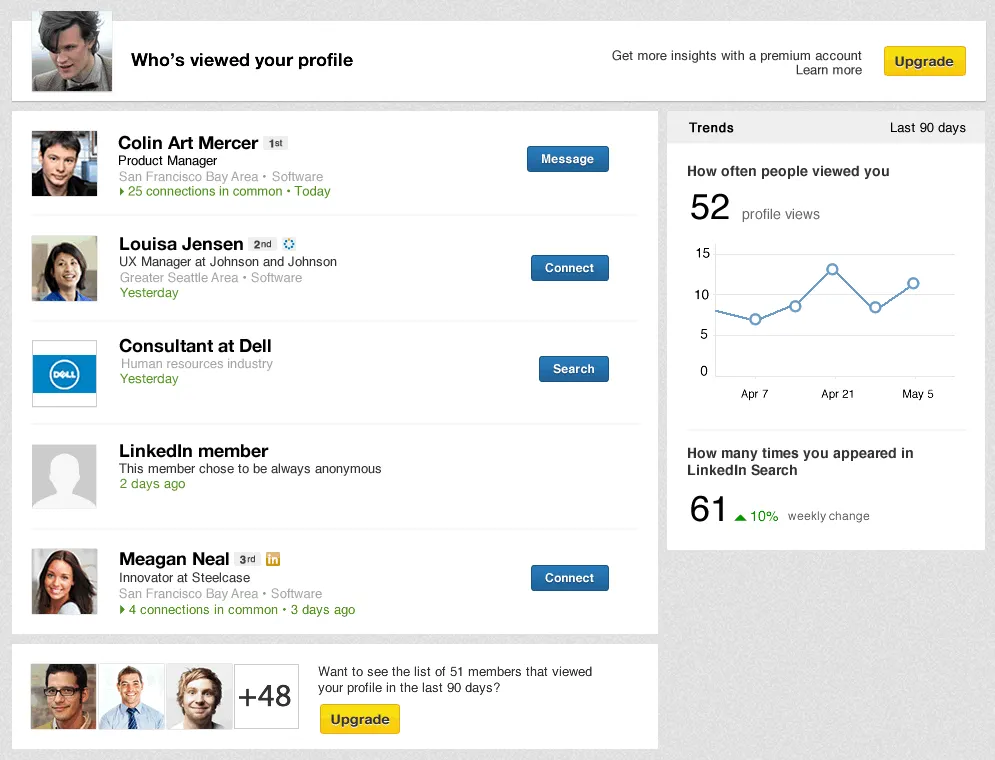
LinkedIn's "Who's Viewed Your Profile" feature works on reciprocity.
When you view someone’s profile in public mode, they see your name, headline, location, and industry , which is why it's essential to Optimize your LinkedIn profile before increasing visibility.
The system tracks every profile visit and categorizes viewers by their privacy settings. For sales teams, this data reveals which prospects are researching you and signals buyer intent.
What Determines What You See
Three key factors control your visibility into profile viewers.
- Your account type matters most. Free accounts see just 5 recent visitors. Premium accounts unlock 90 days of complete history with detailed analytics.
- Viewer privacy settings create limitations. When someone browses in private mode, you only see "Anonymous LinkedIn Member" regardless of your account type.
- Recency affects availability. LinkedIn stores viewer data for 90 days maximum. After that, the information disappears even for Premium users.
The combination of these three factors determines exactly what information appears in your "Who's Viewed Your Profile" dashboard.
How to See Who Viewed Your LinkedIn Profile (Step-by-Step)
1. Desktop Method
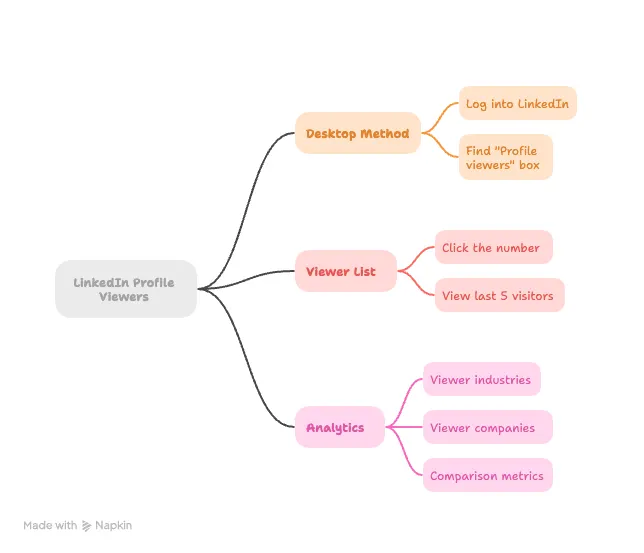
Log into LinkedIn and look directly below the search bar at the top. You will find a section “Profile viewers” that shows how many people have checked your profile.
To access your viewer list:
- Click the number in the "Profile viewers" box
- View your last 5 visitors with names, headlines, and timestamps
- Scroll down for additional analytics showing viewer industries, companies, and comparison metrics
2. Mobile Method
Open the LinkedIn mobile app and follow these steps:
- Tap your profile picture
- Select "View Profile"
- Scroll to "Who's viewed your profile"
- Tap to see viewer details and analytics
The mobile version gives you the same insights as desktop. Check profile viewers instantly when you are away from your computer, perfect for sales professionals who need to respond quickly to prospect interest.
What Information LinkedIn Shows About Profile Viewers
1. Free Account Users
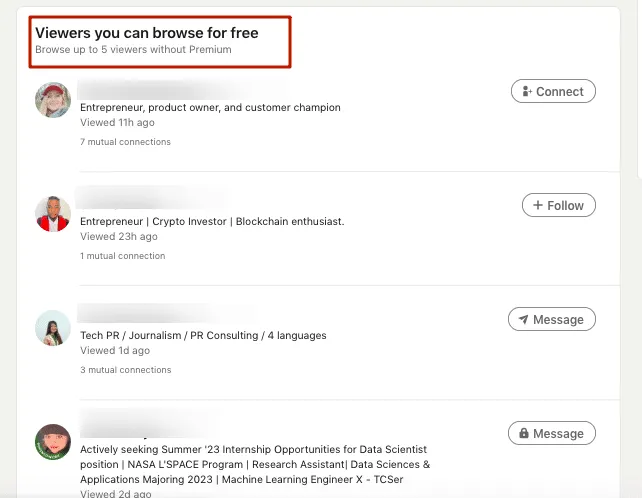
Free LinkedIn members see basic information about their last 5 profile visitors. You get names and headlines only if viewers browse in public mode.
When viewers use privacy settings, you see:
- "LinkedIn Member" for completely private viewers
- Generic job titles like "Someone at Microsoft" for semi-private mode
- Industry information without specific names
- Company size or role level instead of identifying details
Free accounts cannot access historical data beyond 5 recent viewers. You miss trend analytics, peak viewing times, and repeat visitor patterns.
2. Premium Account Users
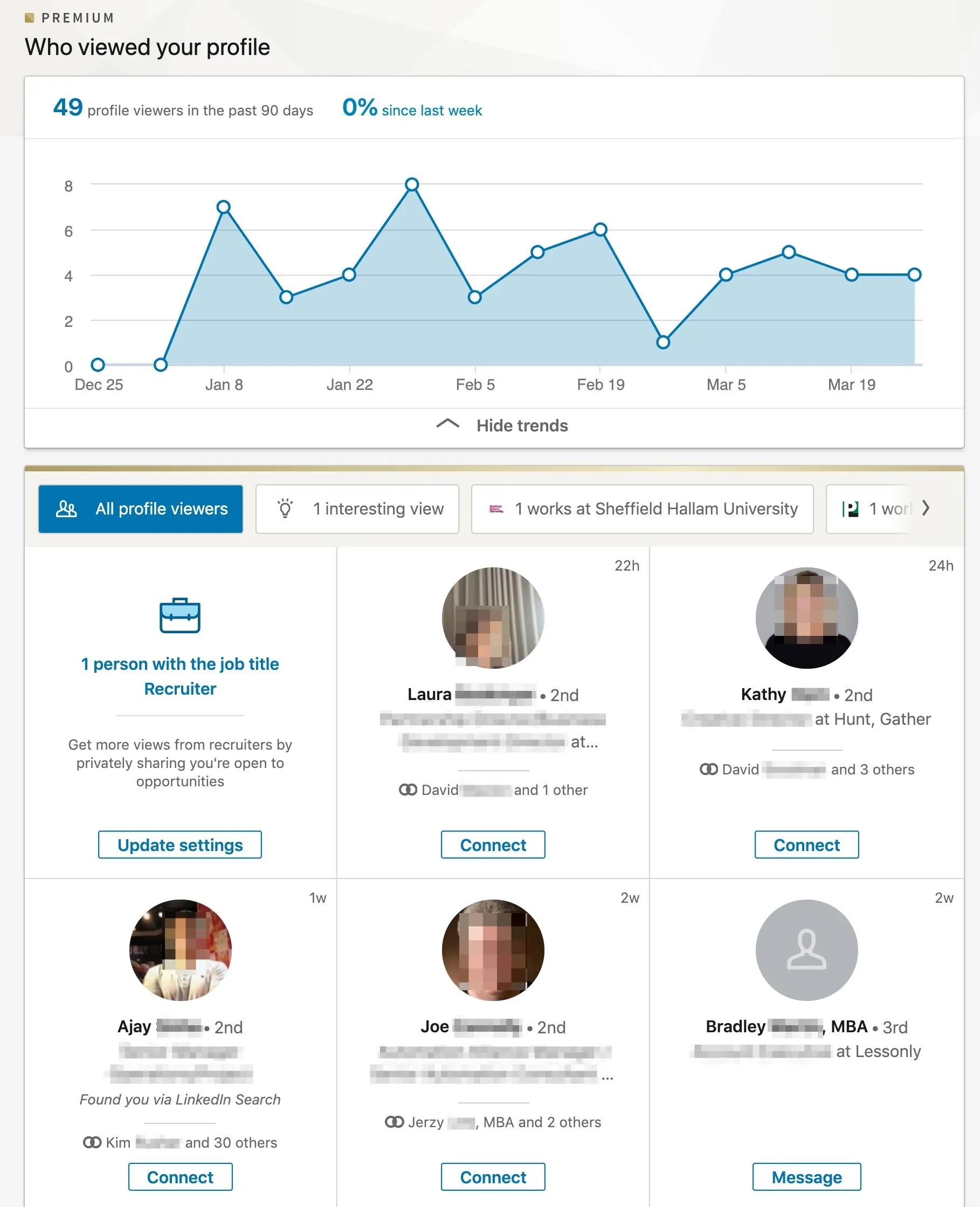
Premium subscribers access the complete list of all visitors from the last 90 days, not just 5.
Premium benefits include:
- Detailed viewer information with names, job titles, companies, and locations
- Trend analytics showing when and how often people visit your profile
- Repeat visitor tracking to identify persistent leads or recruiters
- Filters and insights by industry, role, or company size
- Detailed timestamps for each visit
This transforms profile views into actionable sales intelligence. Identify researching prospects, prioritize warm leads, and time outreach based on demonstrated interest.
Why Profile Viewers Appear Anonymous
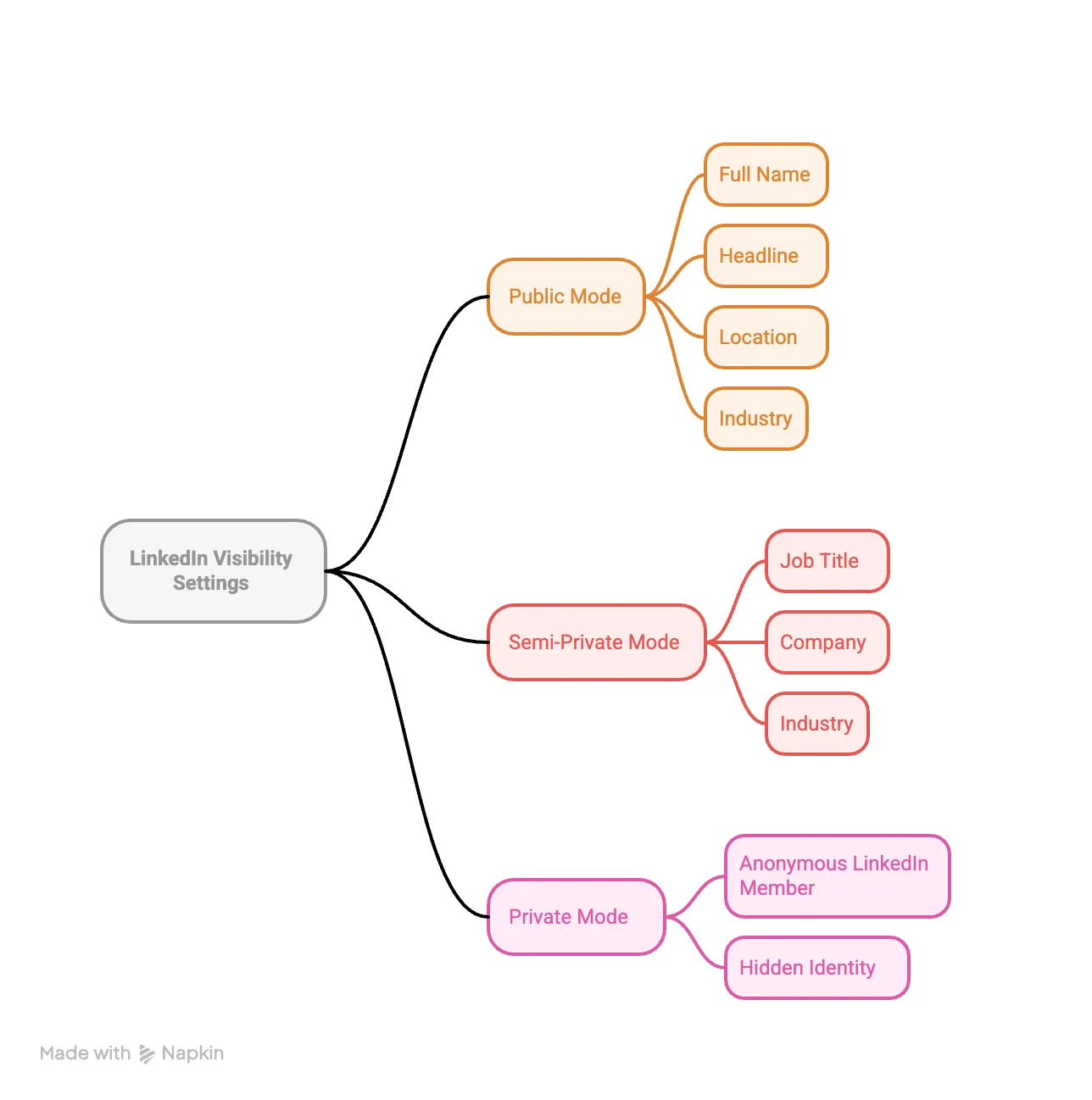
Approximately 20 to 30 percent of profile viewers remain anonymous regardless of your account type. This happens when users enable Private Mode before viewing profiles.
LinkedIn's Three Visibility Settings
- Public Mode displays your full name, headline, location, and industry to everyone whose profile you visit. This maximizes your visibility but exposes your research activity.
- Semi-Private Mode shows generic information like job title, company, or industry without revealing your specific identity. You appear as "VP of Marketing in Internet Industry" or "Someone at Accenture".
- Private Mode completely hides your identity. Profile owners only see "Anonymous LinkedIn Member" with no identifying details.
Even Premium subscribers cannot see private mode viewers. No amount of money bypasses this privacy protection.
The Tradeoff: Viewing Others Anonymously
LinkedIn enforces a reciprocity rule. To see who viewed your profile, you must allow others to see when you view theirs.
- Switching to Private Mode hides your visits but you lose access to your own viewer list. Free users cannot see any profile viewers while in Private Mode.
- Premium users maintain access to historical viewer data in Private Mode, but stop accumulating new viewer information while browsing anonymously.
To enable Private Mode:
- Select the “Me” icon located at the top of your LinkedIn home screen.
- Select "Settings & Privacy" from the dropdown
- Navigate to "Visibility" then "Profile viewing options"
- Choose "Private Mode" to browse anonymously
Most B2B sales professionals keep public viewing enabled. The intelligence from seeing profile viewers outweighs anonymous browsing benefits.
How B2B Sales Teams Use Profile Viewer Data

Profile viewers represent warm leads demonstrating active interest. Someone researching your profile has moved beyond passive awareness to active consideration.
Strategic applications:
- Identify engaged prospects who viewed your profile after receiving connection requests or messages
- Track decision-makers from target accounts, then move them into LinkedIn lead generation workflows for stronger outreach.
- Measure content effectiveness by monitoring profile view spikes after publishing posts
- Prioritize warm leads over cold outreach for higher conversion rates
- Understand buyer journey stages based on viewing patterns
Single views suggest initial research. Repeat visits indicate serious consideration worth immediate follow-up.
LinkedIn Automation and Profile View Optimization
Manual profile viewing becomes unsustainable at scale. Sales teams handling hundreds of prospects need systematic approaches to track engagement and automate follow-up.
- Profile visit automation allows you to systematically view targeted prospect profiles to increase visibility.
- When you view someone's profile, LinkedIn notifies them, prompting approximately 20 to 30 percent to visit your profile in return.
Safe automation limits for 2025:
- Profile views: 50 to 120 per day depending on account age
- Connection requests: Up to 100 per week, not per day
- Messages: Below 100 daily for most accounts
- Content posting: 2 to 3 times weekly for optimal algorithm favorability
Scale with Bearconnect
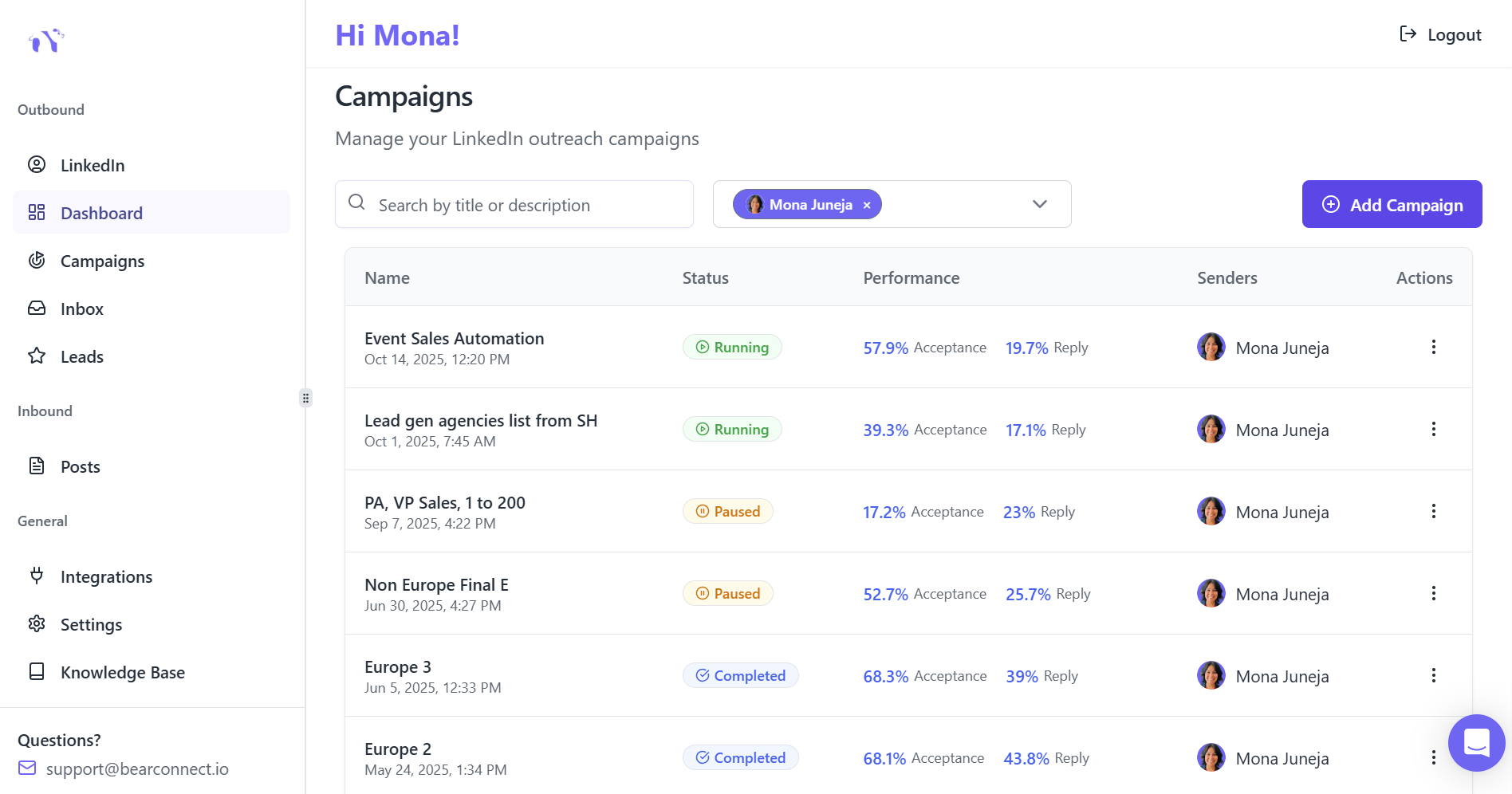
Bearconnect provides cloud-based LinkedIn automation for sales teams, agencies, and founders who need to scale outreach while maintaining authenticity.
The platform automates profile visits, connection requests, follow-up sequences, and content scheduling from a unified dashboard.
Pricing structure:
- $67 per month per LinkedIn account
- $57 per month per account when connecting 5 or more profiles
Key features for tracking profile engagement:
- Unified inbox consolidating all LinkedIn conversations across multiple accounts
- Analytics reporting showing which campaigns drive profile views and engagement
- Import data functionality to track prospects through your entire sales funnel
- Unlimited LinkedIn campaign support without Sales Navigator requirements
The platform integrates with HubSpot and Salesforce, allowing you to correlate profile views with pipeline progression and revenue outcomes.
Optimize Your Profile Before Tracking Viewers
Profile viewers only convert if your profile communicates clear value. Optimize your profile to convert attention into business results before focusing on who views it.
Critical optimization elements:
- Profiles with professional photos receive 21 times more views and 36 times more messages.
- Your photo creates the first impression before anyone reads your headline.
- Your headline appears in every LinkedIn interaction. The first 45 characters determine whether people click or scroll past.
Use the formula: Role + Value Proposition + Searchable Keywords.
"LinkedIn Automation for B2B Sales Teams" outperforms generic titles like "Sales Professional."
Active profiles outperform dormant ones by 6 times in search visibility. Establish a 30-day content baseline before launching automation campaigns.
Document baseline metrics including profile views per week, search appearances, connection acceptance rate, and message response rate.
Measure Profile View Success
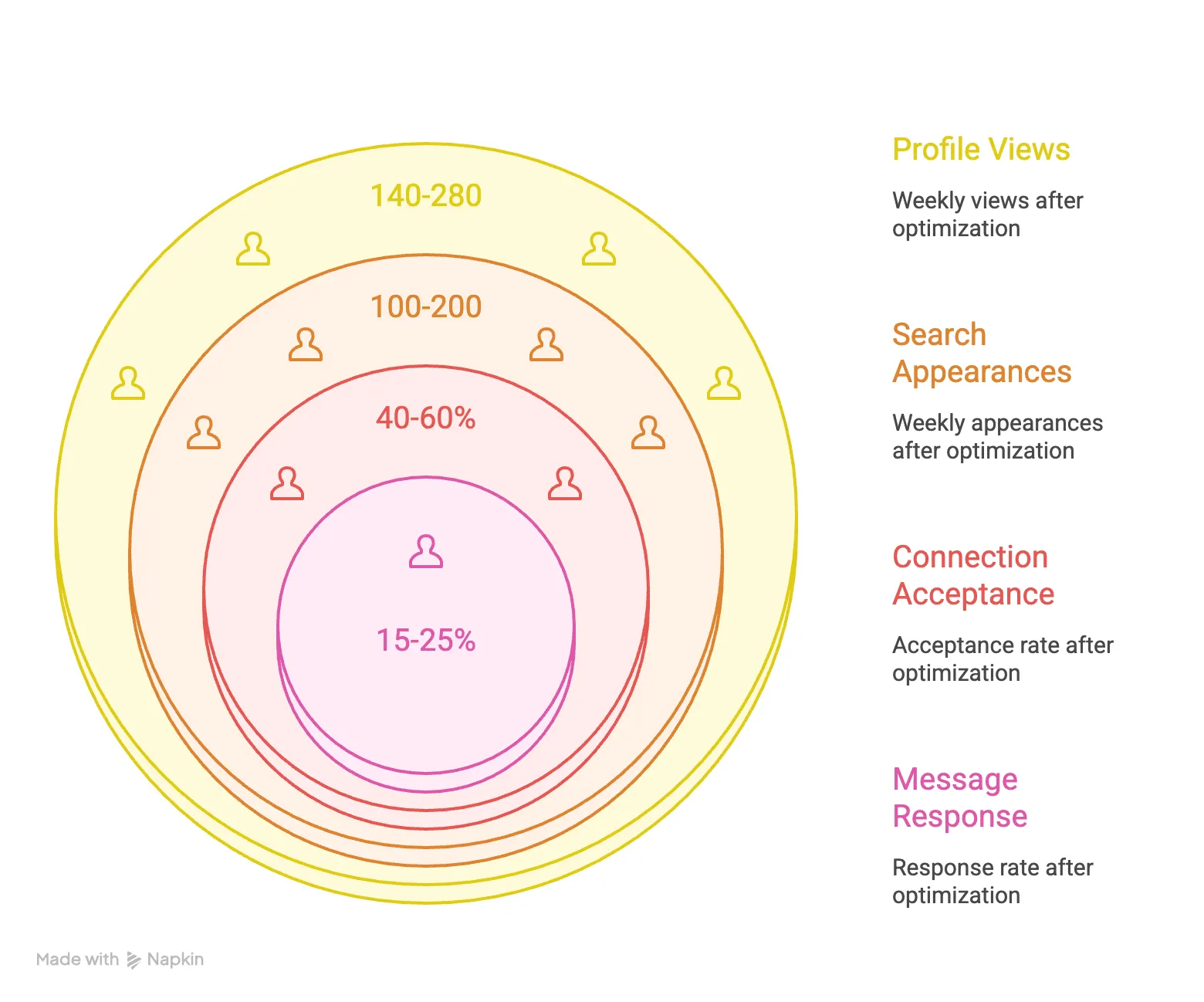
Track six critical metrics to understand your LinkedIn visibility and engagement:
- Profile views per week should increase from 10 to 20 baseline to 140 to 280 after optimization.
- Search appearances indicate how often you appear in LinkedIn search results. Aim for 100 to 200 weekly appearances after optimization, up from 5 to 10 baseline.
- Connection acceptance rate measures how many people accept your requests. Optimized profiles achieve 40 to 60 percent acceptance compared to 15 to 25 percent for unoptimized profiles.
- Message response rates reflect how compelling your value proposition appears. Target 15 to 25 percent response rates, up from 5 to 8 percent baseline.
- Profile viewer demographics reveal whether you're attracting your target audience. Premium accounts provide detailed breakdowns by industry, role, company size, and location.
- Repeat visitor tracking identifies prospects conducting serious research before reaching out. These represent your warmest leads deserving immediate priority.
Start Tracking Your LinkedIn Profile Viewers Today
LinkedIn shows who views your profile, turning curiosity into actionable sales intelligence. Track prospect interest, identify warm leads, and time your outreach perfectly.
Quick recap:
- Free accounts see your last 5 profile viewers
- Premium unlocks 90 days of complete history with analytics
- Profile viewers represent warm leads worth prioritizing
The real power comes from pairing profile view data with smart automation. Bearconnect scales your LinkedIn outreach while tracking every engagement across multiple accounts.
Ready to turn profile views into qualified conversations?
Try Bearconnect free for 7 days with no credit card required.
Automate campaigns, manage unlimited LinkedIn accounts, and track engagement from one unified dashboard built for sales teams who demand both authenticity and scale.
Frequently Asked Questions
1. Can you really see who viewed your LinkedIn profile?
Yes. LinkedIn shows profile viewers, but Free users only see the last 5 visitors, while Premium users get 90 days of full viewer history.
2. Why do some LinkedIn profile viewers appear as anonymous?
Viewers appear anonymous when they browse in Private Mode. LinkedIn hides their name, even if you have a Premium account.
3. Does LinkedIn notify someone when you view their profile?
Yes, if you view profiles in public mode. They can see your name, headline, and workplace unless you switch to Private Mode.
4. What’s the benefit of tracking who viewed my profile?
Profile viewers show active interest. For B2B sales teams, this reveals warm leads, buyer intent, and perfect timing for outreach.
5. How do I check who viewed my LinkedIn profile?
Go to your LinkedIn homepage → Click Profile viewers. On mobile, open your profile and scroll to Who’s viewed your profile.
Author bio:
Written by Mona Juneja, a B2B Sales Strategist with over 20+ years of sales experience at big names like Microsoft, Oracle, and DELL. I helped multiple Agencies streamline prospecting workflows, improve connection rates, and generate consistent sales-qualified leads through ethical LinkedIn automation practices.
Ready to Transform Your LinkedIn Strategy?
Join thousands of professionals already using Bearconnect to automate their outreach and grow their network.
7-day free trial • Cancel anytime
Related Articles

How B2B Sales Teams Close More Deals by Automating LinkedIn Outreach?
Automate LinkedIn outreach to help B2B sales teams generate leads, start conversations, and close more deals faster with proven strategies.
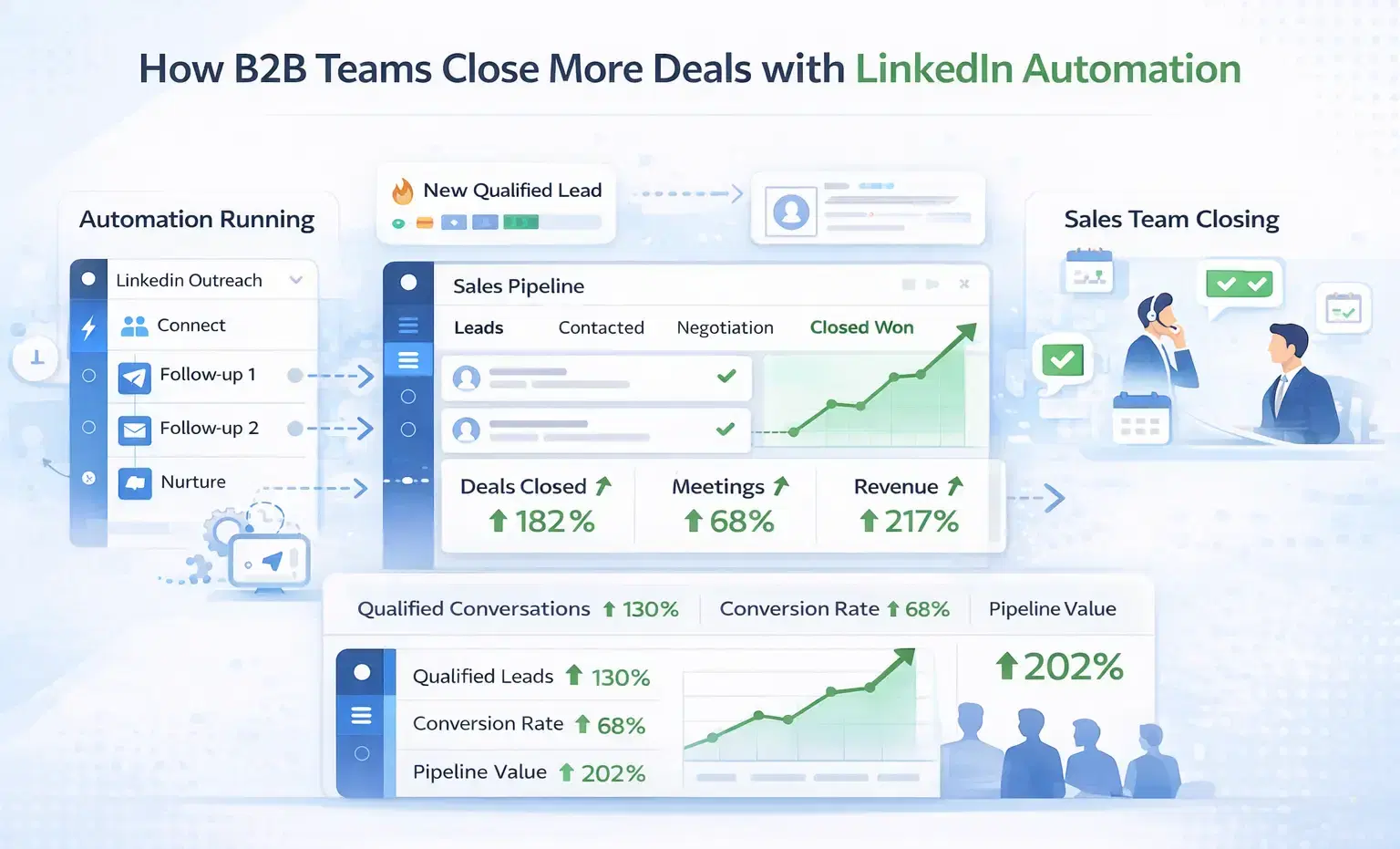
How B2B Sales Teams Close More Deals by Automating LinkedIn Outreach?
B2B sales teams waste hours on manual LinkedIn outreach. Automation fixes that more meetings, less grind, better conversions at scale.
How Can SDRs Book More Meetings Using LinkedIn Automation?
SDRs can book more meetings with LinkedIn automation by streamlining outreach, automating follow-ups, and scaling conversations without manual effort.